

Bring your own AI agent
To bring your own AI agent to your ecommerce store means using the AI coding agent you already have, such as Claude Code, Codex, Google Antigravity or Cursor, to do real work on your UltraCart store. The agent runs the StoreFront Agent Toolchain, a command line tool that reads and edits your StoreFront pages, items and more. You choose the agent, and you choose what you hand it to work from.
This sits alongside UltraCart's built-in AI, not in place of it. The UltraCart AI Assistant, the AI Report Builder and AI chat agents are ready to use inside your account. Your own agent is for merchants and developers who want to bring their own tools and their own context. It works on your store from the merchant side; for the shopper side, see agentic commerce explained for merchants.
Context for your own AI agent
An AI agent is only as good as what it can see. Give it a one-line request and you get a general answer. Give it your actual files and data and you get a specific one.
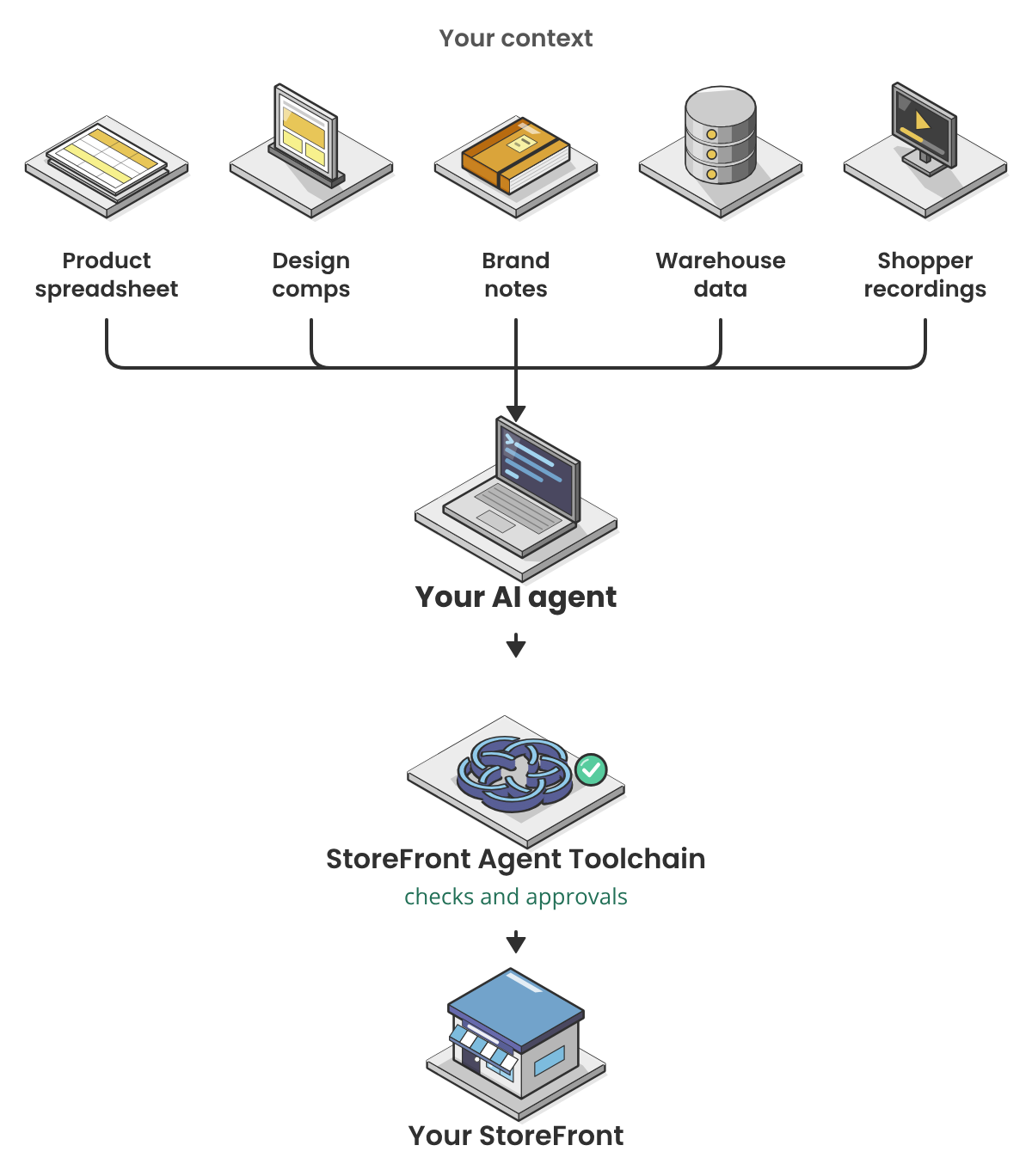
Because the toolchain is a command line tool, your agent can work in a folder on your own machine, so anything you put there is in reach. Here is the context you can bring, and how each kind reaches the store:
| Context you bring | What your agent does with it | How it reaches the store |
|---|---|---|
| Item data and spreadsheets | Reads and tidies the sheet, prepares the changes | Item commands that check before they write |
| Screenshots and design comps | Reads the layout, type and color | Page and theme commands, previewed first |
| Brand guidelines | Follows your voice, palette and fonts | Notes saved as files it reads before building |
| Warehouse data | Connects to your data and works from the answers | The answer shapes the next change |
| Shopper recordings | Finds rage clicks and script errors | Findings become page fixes |
Items and spreadsheets
Your product data is likely in local spreadsheets, in a format that exports easily to one, or already in UltraCart. Your agent can read the sheet, tidy it and hand it to the toolchain's bulk item command, which checks the change before it writes.
Turning an Excel or Google Sheets file into that CSV is your agent's job, not a toolchain feature. Item changes cover attributes, titles, descriptions, SEO, variations and images. Redirects follow the same pattern: export the rules to a CSV, let your agent fix them and import them.
Designs and brand notes
Attach a screenshot, a Figma export, a page you admire or a photo of a sketch, and the agent reads the layout, type and color and builds to match. Brand notes work the same way. The more of your brand that sits in files, the less you have to explain in the prompt.
For our own builds we handed the agent a folder like this:
- Brand notes: positioning, voice, logo, type and products.
- A palette file: every theme color role, ready to apply in one command.
- Design comps: home, product and About pages as images and source.
- Real items: products, prices and photos already in the catalog.
Give your agent store data
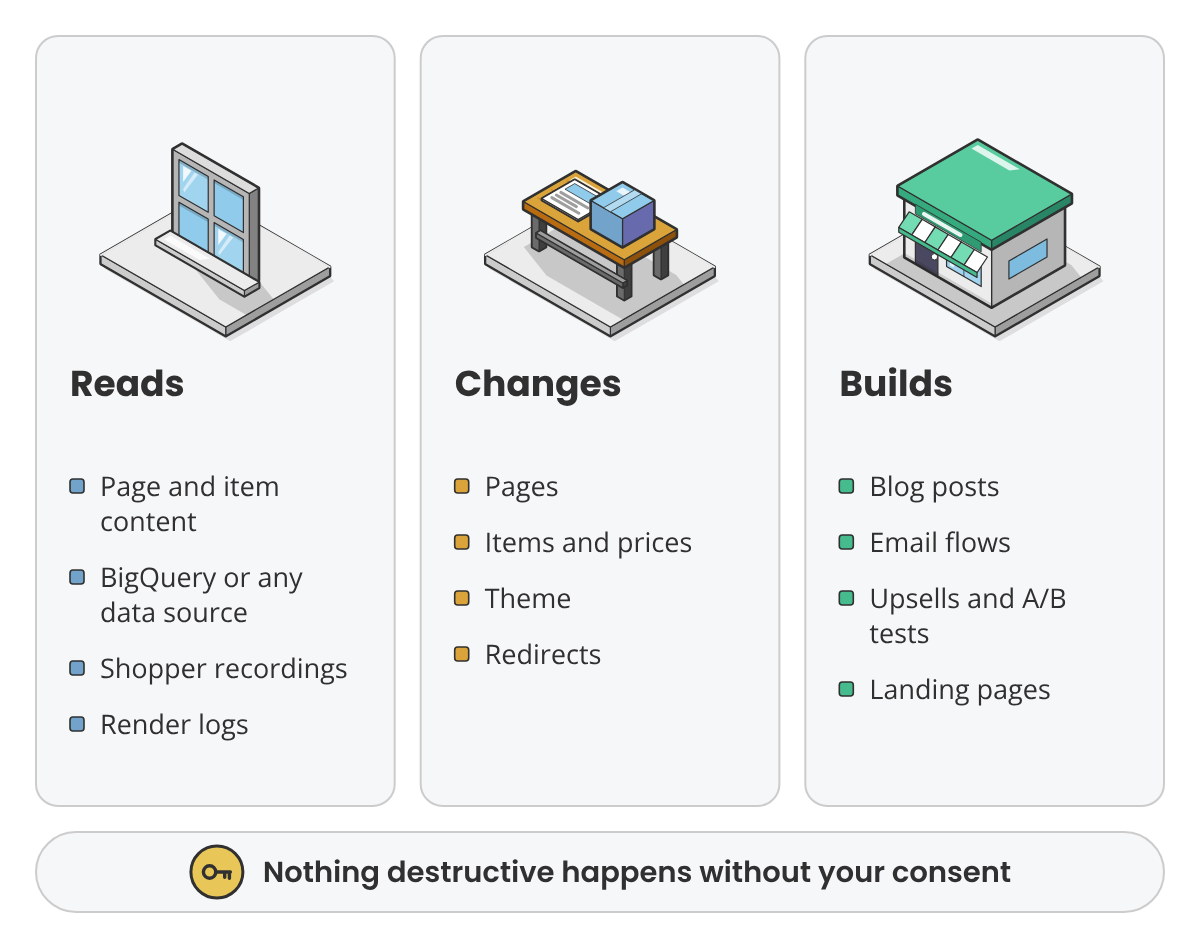
Your agent can connect directly to BigQuery, or to anywhere else you keep data using its normal connectors, and bring that content in through the UltraCart CLI to act on it in the same session. It runs with your own credentials, so any charges land on your own account.
Sales and order data come through the warehouse, and the toolchain's own order lookup lists test orders only. Read about the UltraCart data warehouse to see what your account can reach, and how AI-powered BigQuery reporting works on the same data.
Your agent can also read a shopper's session from StoreFront recording, then fix the page where visitors got stuck. Recording is billed per 1,000 sessions once its 14-day trial ends, and your agent turns it on or off only when you ask. One honest note on privacy: query results are read by whichever AI model you chose, so that vendor's terms apply. If you only want to ask an assistant questions about your store data, the UltraCart MCP server is a separate option.
Guardrails travel with your agent
Handing a general-purpose agent more context only works if something keeps it in bounds. Most of these checks are built into the toolchain and UltraCart, so they apply whichever agent is driving. One, the preview, is guidance in the agent skill.
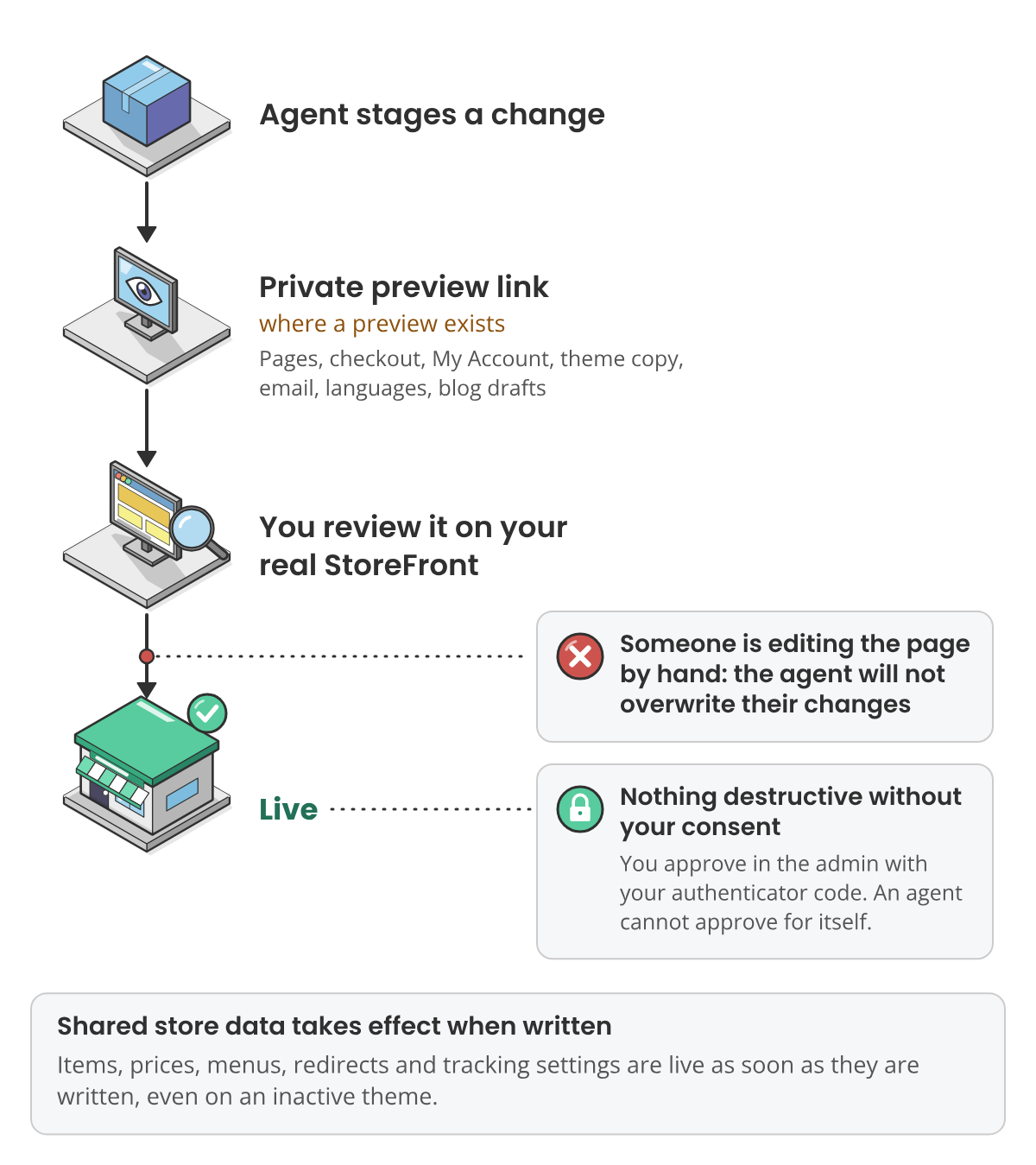
- Preview first: the skill tells your agent to stage a change and send you a private link to see it on your real StoreFront before it writes.
- Live is opt-in: writing to your active theme needs an explicit go-live step and an account with publish permission. Shared store data, such as item content and prices, menus, redirects, page settings and tracking settings, is live as soon as it is written, even on an inactive theme.
- Your manual edits are protected: if someone is editing a page by hand while your agent tries to change it, the agent's write is refused and nothing is overwritten.
- Consent for destructive actions: your agent can build and change pages, email flows, blog posts and more, but it will not fire destructive actions without your approval in the admin.
- Secrets stay out of the chat: you enter them in the admin, and the agent gets a handle in place of the value. It never asks you for a secret in the conversation.
Start on a test StoreFront and review what your agent proposes. The safety and approvals documentation covers the details.
A full build in minutes, not weeks
A full storefront buildout is usually planned in weeks. We ran three end to end on the free Skeleton theme, covered in our companion article, Customize an Ecommerce Theme with AI. Each started from the folder above: brand notes, a palette file, three design comps and real items already in the catalog. Each ended with a themed storefront, including the header, home, product and About pages and footer.
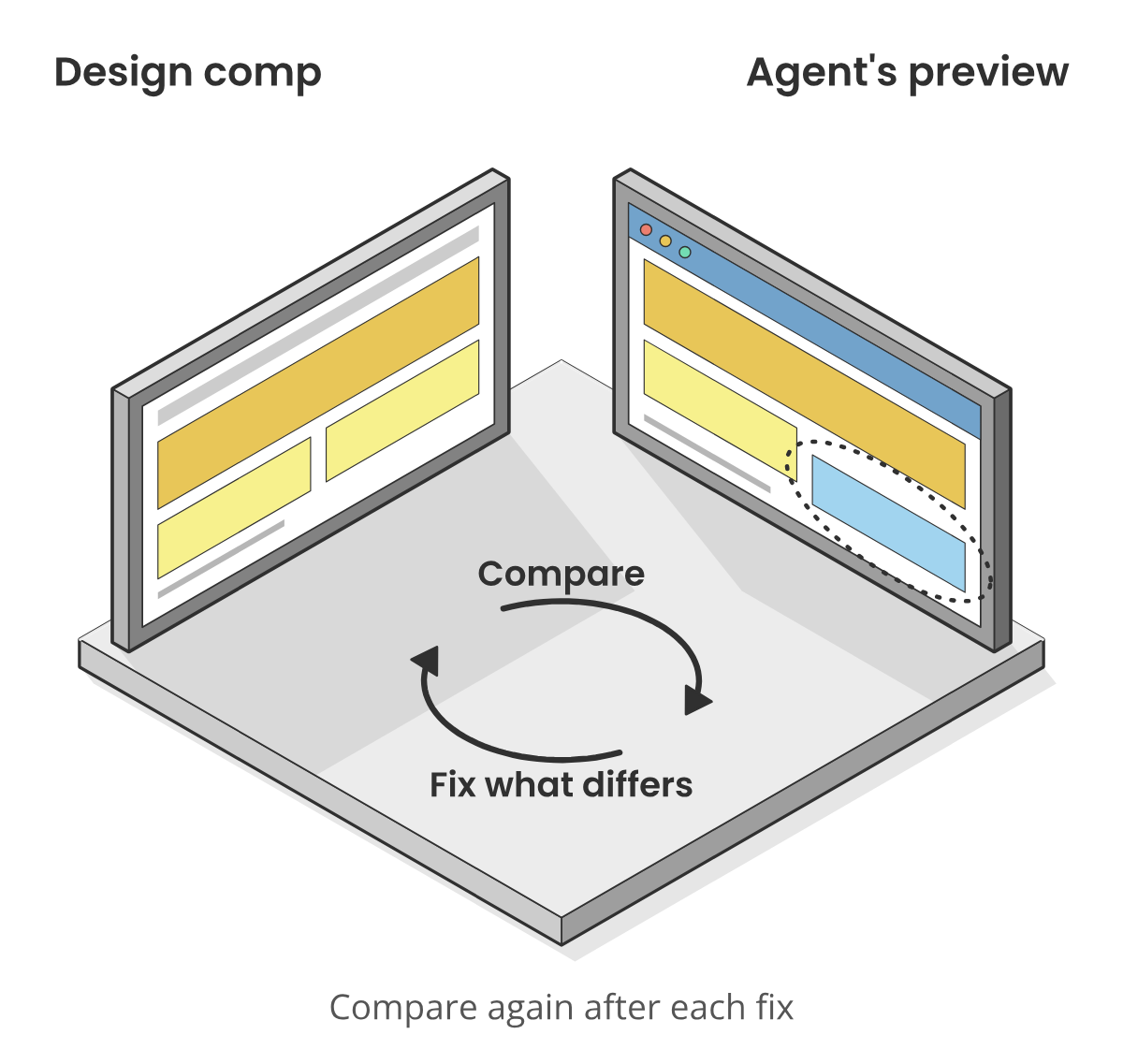
Each build took about 12 to 17 minutes. We gave the agent context, including the design comps, fonts and colors to use, and it took it from there. The comps gave it something to measure against, so it compared each preview with its comp and fixed what differed.
Why one toolchain covers so much
The toolchain is not a thin layer over an API. Pages, menus, items, orders, email, experiments, upsells, redirects, shopper recordings and theme settings each have their own commands. Your agent works from a packaged catalog of more than 550 elements, with field notes earned on live storefronts.
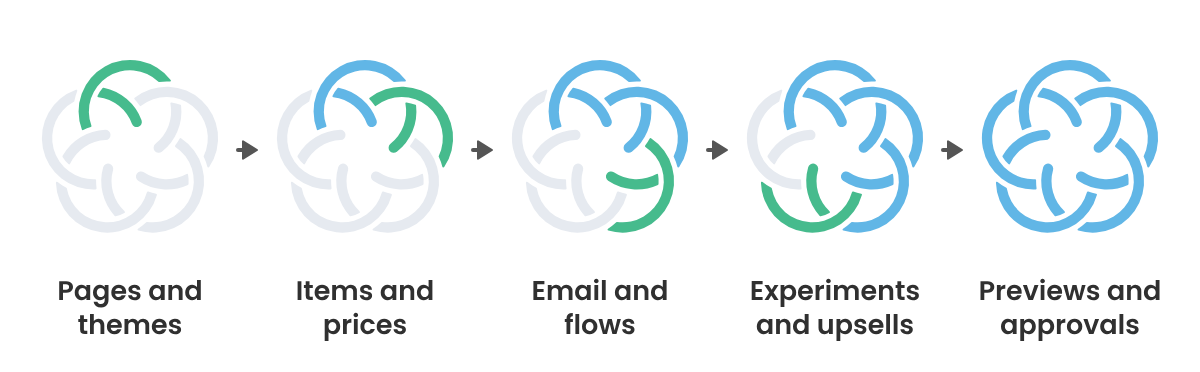
Each piece follows how stores actually go wrong. Visual changes show you a private preview before they go live. A write that would overwrite someone's manual edit is refused. Destructive actions need your approval. Decades of running ecommerce at UltraCart set that order of operations.
That makes it a good fit if you want to build your store out yourself. Your agent does the work, the toolchain brings what UltraCart knows about changing a store safely, and you keep the final say.
“I feel like I finally have control over my own site. As a small business owner, it’s like having a development and marketing team right next to me.”
Lorain, CEO, Doodle Pants
Start in the beta
The toolchain is in public beta and still changing release by release. The toolchain itself is free to use: install it from npm (Node.js 24 or newer), connect your store and pay for your own AI agent with its provider. Some UltraCart features your agent can switch on carry their own charges, such as extra storefront languages, screen recording after its trial, postcards and SMS.
If the CLI says your account is not enabled yet, email support@ultracart.com with your Merchant ID. The skill installs natively for Claude Code, Codex, Google Antigravity and Cursor, and other agents read it from your workspace.
A free UltraCart developer account gives developers a test storefront to work in. You can also edit any StoreFront by hand in the Visual Builder while you try this.
Bring your own AI agent FAQ
What does it mean to bring your own AI agent?
You use the AI agent you already have, such as Claude Code, Codex, Google Antigravity, Cursor, GitHub Copilot, OpenCode or any agent that can run commands in a terminal. It works on your store by running the toolchain's command line tool.
Why bring your own AI agent?
You keep the agent and subscription you already use, the settings you have tuned, and your own files and data in reach. It sits alongside UltraCart's built-in AI tools, not in place of them.
Is the toolchain an MCP server?
No. It is a command line tool, a catalog of StoreFront elements and an agent skill, and your agent runs commands and reads JSON. UltraCart also offers a separate MCP server for connecting an assistant to your store data.
What store data can my agent read?
Page and item content through the toolchain, plus data from BigQuery or other sources your agent can connect to, shopper recordings and render logs.
Can the agent change prices or delete things on its own?
No. Destructive or risky changes, such as deleting content or changing prices, need your approval in the UltraCart admin, and an agent cannot approve for itself.
Can I undo what the agent did?
Mostly. Saves are versioned, and a revert restores an earlier version.
Does it cost anything?
The toolchain is free to use, and you pay for your own AI agent with its provider. Some features an agent can switch on carry their own charges, such as extra storefront languages, screen recording after its trial, postcards and SMS, and warehouse queries run against your own BigQuery project.
Can I use it today?
Yes. Install it from npm and connect your store. If your account is not enabled yet, the CLI says so, and UltraCart support can enable it.
Want your own agent working with your own context? Get the beta of the StoreFront Agent Toolchain, connect your store and decide what you would hand it first.