
Validate addresses at checkout
The cheapest moment to fix a bad shipping address is the moment before the order exists. Data-quality teams describe this with the 1-10-100 rule: it costs about a dollar to catch a bad address as it is entered, ten dollars to correct it later in a batch, and a hundred dollars or more once a package has already shipped to the wrong place. Address validation at checkout lives at the one-dollar end of that curve.
The check runs in real time against authoritative postal data, including USPS CASS data in the United States. A deliverable address passes straight through, a correctable one gets standardized, and an address that cannot be confirmed is flagged before it ever reaches your label printer. The mistake is caught at the source instead of inherited by your warehouse, your carrier invoice, and your support queue. We added up exactly what that downstream mess costs in the hidden cost of bad address data.
What validation does
Address validation quietly does two jobs while the customer fills out the form, and most shoppers never notice either of them:
- Verification: confirms the address is real and deliverable by matching it against the postal database, so an order never ships to a place that does not exist.
- Standardization: cleans up the format, fixing things like a missing ZIP+4 or an abbreviated street suffix so the label matches what the carrier expects.
Verification and standardization work together to catch the small input problems, the flipped digits, the skipped apartment fields, the old browser autofill, that account for the majority of bad addresses, all before they ever reach fulfillment.
What the shopper sees
Most of the time, the shopper sees nothing at all. A clean, deliverable address passes silently and checkout continues. The experience only surfaces when something is actually off, and even then it is a single short prompt:
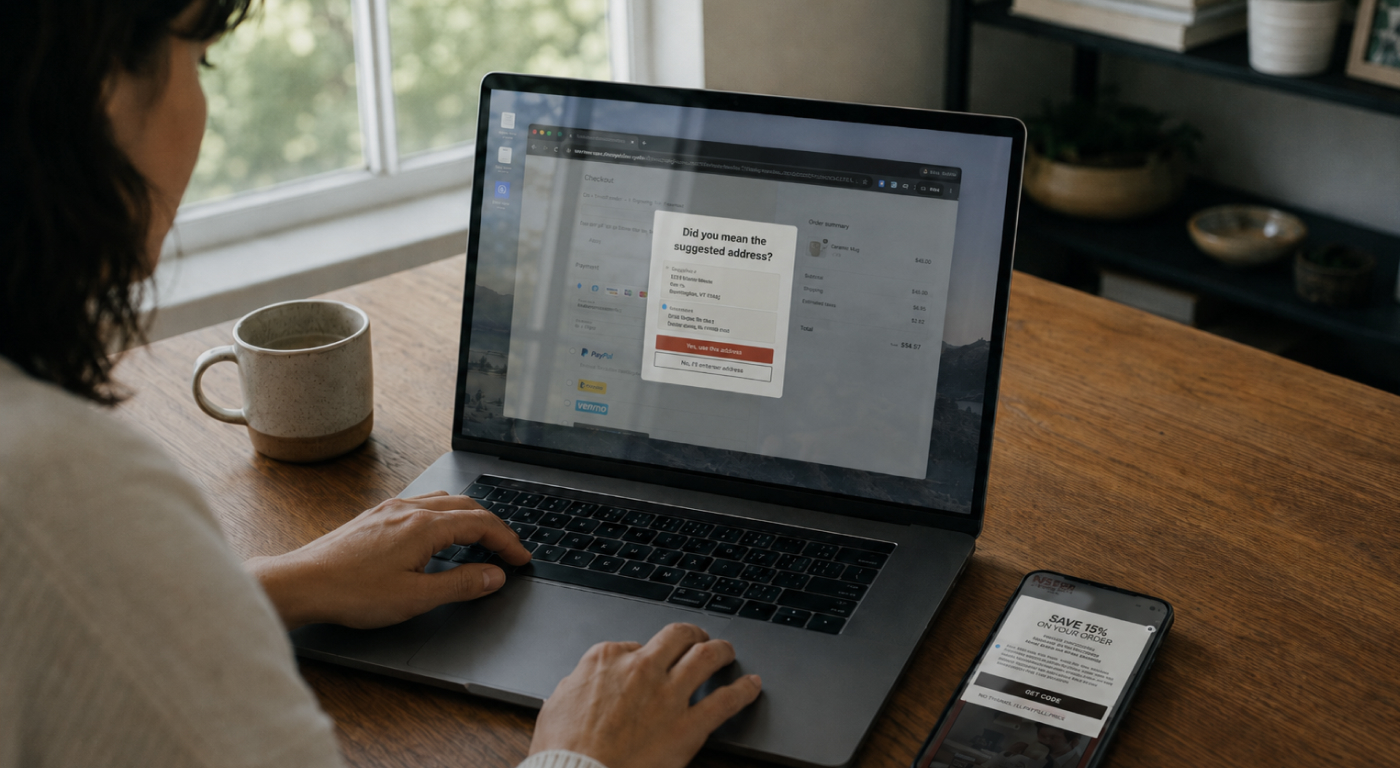
- The suggestion prompt: when a cleaner, standardized version exists, the customer sees a "Did you mean the suggested address?" prompt with their entry and the suggested version side by side. They accept the correction or keep what they typed.
- The confirm prompt: when the address cannot be verified at all, the customer sees a confirm step whose behavior you set in advance.
That fallback rule is yours to decide. You can let the order through, require a phone number so you can reach the customer about delivery, or block the order until they enter something deliverable. It is the dial that balances checkout friction against delivery certainty, and you set it once. UltraCart's shipping address validation documentation walks through each path and exactly what the shopper sees.
The downstream payoff
Address validation is usually filed under shipping, and that is exactly where the savings land. Catching a bad address at checkout removes a whole chain of downstream costs before any of them start:
- No correction fees: the address is verified before the label prints, so carriers have nothing to correct and nothing to bill back to you.
- Fewer failed deliveries: verified addresses reach the right door on the first attempt, which protects both your shipping budget and the customer relationship.
- Stronger repeat business: a failed delivery is one of the fastest ways to lose a customer, so getting the address right the first time protects the orders that come after it.
- Cleaner data downstream: standardized addresses flow into your fulfillment process and reporting instead of polluting them.
It is the same logic as the rest of a tight checkout: fix the problem at the source and you stop paying for it everywhere else. If you are auditing the whole flow, our checkout-first playbook covers how to reduce cart abandonment in the same step.
Built in, not bolted on
On many platforms, address validation is a separate paid app you bolt onto checkout, often with an embedded lookup key sitting in the storefront and a monthly fee on top of your subscription. UltraCart takes the opposite approach. Validation is part of the checkout itself, wired into the CheckoutForm that already renders your shipping fields.
The lookups run server-side, so UltraCart calls the verification service with your credentials and no address-lookup key is ever exposed in the shopper's browser. Standard storefront themes ship with the suggestion and confirm prompts already in place, which means turning this on is a configuration task, not a build-from-scratch project. It is the same philosophy behind the rest of the shipping tools we built into the platform: fewer moving parts, less to maintain, one place to manage it.
How to turn it on
Validation runs on UltraCart through the Smarty Streets integration, which performs the actual address lookups. Connecting it is a short setup:
- Connect Smarty: create a secret key (an Auth ID and Auth Token pair) in your Smarty account, then enter both under Configuration, Checkout, Shipping, Checkout Options in UltraCart.
- Turn verification on: enable "Verify the shipping address at checkout" so entered addresses are checked before an order can proceed.
- Set your fallback: choose what happens when an address cannot be confirmed: allow the order through, require a phone number, or block the order.
- Confirm and test: make sure your checkout theme is on a current version, then place a test order with a deliberately misspelled street to watch the suggestion prompt appear.
Because the verification service bills per lookup, UltraCart includes a monthly verification cap so a traffic spike never runs up a surprise charge. Set it in line with your plan and raise it as volume grows.
Where it fits
Clean addresses are one piece of a tight shipping operation, and they pay off most when the rest of the chain is solid. Verified address data feeds accurate labels, fewer carrier exceptions, and tracking customers can actually trust. Pair validation with reliable package tracking and the broader fundamentals in our guide to eCommerce shipping, and the whole delivery experience gets quieter and cheaper to run.
Address validation FAQ
What is address validation at checkout?
Address validation at checkout is a real-time check that compares the shipping address a customer enters against authoritative postal data, such as USPS CASS data in the United States. It verifies that the address is deliverable, offers a standardized correction when one exists, and flags addresses it cannot confirm, all before the order is placed.
Does address validation reduce shipping costs?
Yes. Catching a bad address at checkout prevents carrier address-correction fees, failed deliveries, and the reships and support tickets that follow. Because a single bad address can cost far more to fix after a package ships than before, validating at the point of entry is the cheapest fix available.
Will validation slow down my checkout?
No. A clean address passes through silently with no extra step. The customer only sees a prompt when their address is correctable or unverifiable, so the vast majority of checkouts are completely unaffected.
Do I need a separate app to validate addresses on UltraCart?
No. Address validation is built into the UltraCart checkout and runs through the Smarty Streets integration server-side. Standard storefront themes ship with the validation prompts already in place, so enabling it is a configuration task rather than a separate app install.
The takeaway
A bad address is cheap to catch and expensive to chase. Caught at checkout, it is a one-second prompt the customer barely notices. Caught after the package ships, it is a correction fee, a reship, a support ticket, and sometimes the customer. Validating the shipping address in the checkout flow puts the fix at the exact moment it costs the least, and on UltraCart it is already built in. Turn it on, set your fallback rule, and let clean addresses become the default.