
x

DisputeDash
Automated dispute management: answer chargebacks with evidence pulled from your own UltraCart order and subscription records.
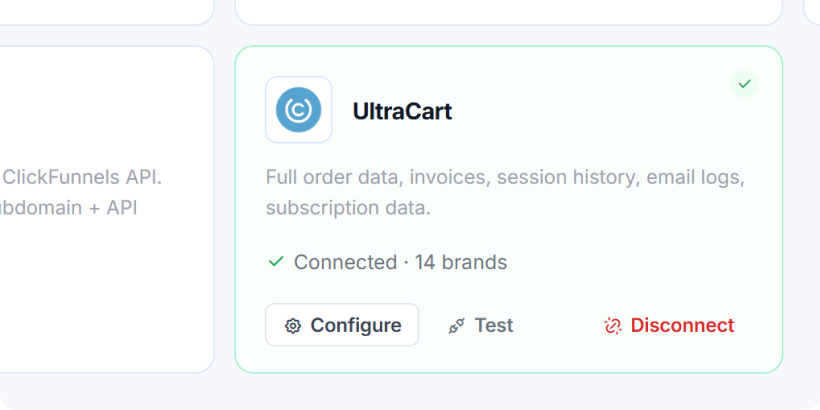
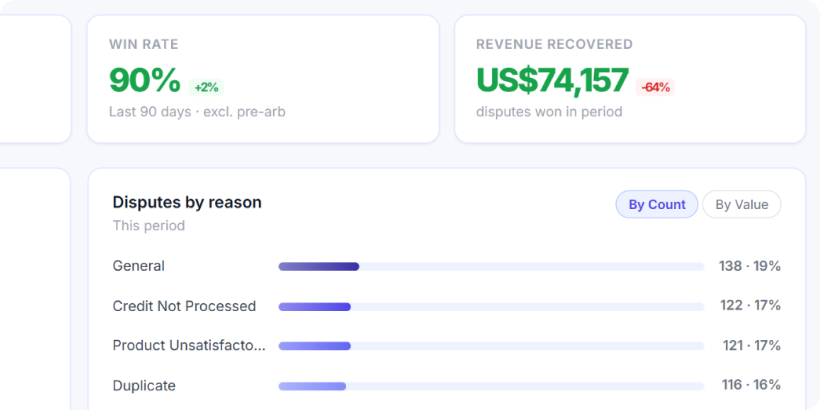
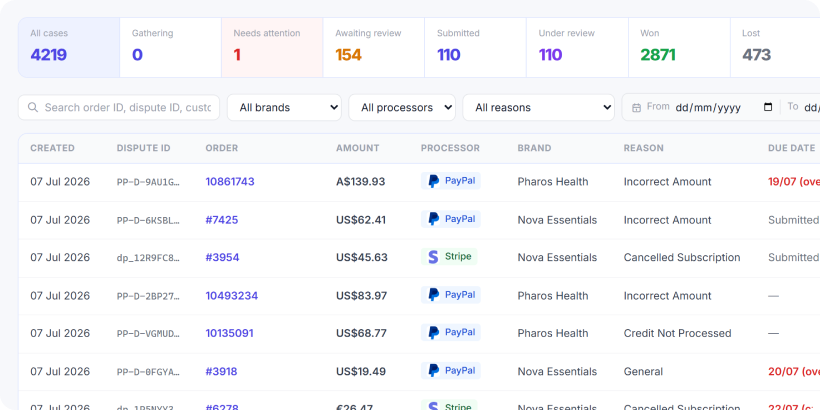
DisputeDash brings chargeback automation to UltraCart. When a dispute opens at your processor, DisputeDash reads the order, delivery, subscription and customer records from your UltraCart account, writes the rebuttal, and files it before the deadline. A human review step is optional, so you can check every packet before it goes out or let the whole lifecycle run untouched.
DisputeDash was built inside a high volume direct to consumer operation, where it spent its early life recovering revenue across a portfolio of subscription brands before it was offered as a product. It arrives here as a new public listing rather than a new system. Across that history it has handled more than 12,000 disputes, recovered over $4.2 million, and held an 87% win rate.
Worked by hand, a single chargeback is most of an afternoon: find the order, read the reason code, pull carrier tracking and proof of delivery, dig the customer's emails out of your helpdesk, then write a rebuttal that answers that specific code before a deadline the bank set for you. Most merchants fight a few properly and let the rest expire, which is the same as conceding them. DisputeDash automates the representment work end to end, because the evidence already sits in the systems it is connected to. It reads the full UltraCart order, covering purchase details, tracking and delivery, billing, the customer profile and prior support contact, and compiles it into a submission ready evidence packet.
The UltraCart connection goes past a read only order lookup, because DisputeDash writes back into your account as well as reading from it. With the automations switched on it adds a disputing customer's email and card to your UltraCart fraud filter so the same buyer is declined next time, places a refund block on the disputed order so nobody refunds a charge you are actively fighting, and records the outcome as a merchant note where your team already works. It also reads auto order history, which turns a subscription customer's full billing record into evidence on a rebill dispute. Connecting is one click through UltraCart's own authorization screen, and DisputeDash states that the fraud filter and refund block run on UltraCart and on no other checkout platform it connects to.
- Automated Fraud Filter Writes: When a chargeback lands, DisputeDash adds the customer's email and card to your UltraCart fraud filter, so repeat offenders are declined automatically.
- Automatic Refund Block: A refund block goes on the disputed order in UltraCart, so a charge you are actively fighting cannot be refunded out from under you.
- Subscription History as Evidence: Auto order history is pulled from UltraCart to prove an ongoing, accepted customer relationship, which is some of the strongest evidence in a subscription dispute.
- Automated Evidence Assembly: DisputeDash reads the full UltraCart order, covering purchase details, tracking and delivery, billing, customer profile and prior contact, and compiles it into a submission ready evidence packet.
- Merchant Notes Written Back to the Order: The dispute and its outcome are recorded as a merchant note on the UltraCart order, so your team sees the full chargeback history right where they work.
DisputeDash FAQ.
How does DisputeDash connect to my UltraCart store?
In one click. You choose Connect with UltraCart, approve DisputeDash on UltraCart's own authorization screen, and you are done. There is no API key to generate or paste, and each brand connects its own store.
What can DisputeDash see and change in my UltraCart account?
It reads orders, subscriptions, customers and conversations to build evidence. It writes only if you switch the automations on, and those writes are a merchant note, a refund block on the disputed order, and fraud filter entries. Nothing else.
Do I have to build the chargeback response myself?
No. DisputeDash gathers the evidence from UltraCart and your payment processor, assembles the rebuttal, and submits it automatically. A human review step is optional on the cases that need it.
Does DisputeDash work with my payment processor?
It connects to Stripe, Braintree, PayPal, Adyen, Checkout.com, Square, Klarna, PayArc, Finix and Airwallex, so it fits whatever you are using to bill through UltraCart.
Can it handle subscription and recurring billing disputes?
Yes, and this is a strength. It uses your UltraCart auto order history as evidence of an ongoing, accepted relationship, which is some of the most persuasive evidence in a subscription chargeback.
Will it stop repeat fraudsters?
If you turn on the fraud filter automation, DisputeDash adds a disputing customer's email and card to your UltraCart fraud filter automatically, so future orders from them are declined at checkout.
Explore Integrations by Category
Accounting
QuickBooks, QuickBooks Online, Oracle NetSuite, etc.
AI
PayPal Agentic Commerce, AI Agents, Webchat, etc.
Affiliates
UltraCart Affiliate Management, Everflow, iDevAffiliate, etc.
Analytics & Reporting
Reports and Dashboards, Screen Recording, Google, etc.
Chargebacks & Disputes
Fraud Prevention, DisputeDash, Chargebacks911, etc.
Call Centers
GreatFalls, West, TeleDirect, Teleperformance, etc.
CRM
UltraCart CRM, Hubspot, Salesforce, Zoho, etc.
Fulfillment
Extensiv, Fulex, Fulfillment by Amazon, ShipStation, etc.
Items
Subscriptions, Reviews, Digital, Activation Codes, etc.
Loyalty & Discounts
UltraCart Coupons, Gift Cards, Loyalty, etc.
Marketplaces
Faire, Walmart.com, eBay, SPS Commerce, etc.
Marketing
UltraCart Communication, Mailchimp, Klaviyo, etc.
Membership
aMember, Kajabi, Wishlist Member, etc.
Operations
AI Agents, Reports and Dashboards, Tasks, etc.
Payment
PayPal, Stripe, Amazon Payments, Authorize.net, etc.
Rev Enhancement
A/B Testing, Upsells and Downsells, AR Retry, etc.
Shipment
UltraShip, FedEx, TQL Freight, Stamps.com, AfterShip, etc.
Taxes
Anrok, Avalara, TaxCloud, TaxJar, etc.
Transfer & Migration
Shopify, BigCommerce, WooCommerce, Custom Import Tools.
Advanced
eBay, EDI, UltraCart API and Webhooks, etc.
Support
Our dedicated, support team is here to help you every step of the way!
Never outsourced. 100% in-house, US-based support.
Talk to real people who understand your business—no AI bots, no automated responses. Our experienced team is ready to help you solve problems, big or small.
Learn MoreQuick answers to common questions.
Need assistance fast? Access our robust knowledge base or connect with a support representative for swift resolutions.
View FAQExtensive documentation and code examples.
Dive into our detailed guides and examples to optimize your UltraCart experience. From setup to advanced features, our resources cover it all.
View DocsPersonalized phone and email support.
Pick up the phone and speak directly with our expert team, or send an email for personalized assistance tailored to your needs.
Reach Out!Video training tutorials, guides and tips.
Explore a library of easy-to-follow video resources to master every feature of UltraCart and maximize your eCommerce success.
View VideosOnboarding Assistance for New Merchants.
Get personalized help setting up your store, adding products, and integrating payment gateways to launch quickly and confidently.
Contact Support