


The Problem with Scattered Customer Data
Every eCommerce merchant has been there: a customer reaches out, and you find yourself opening three different tabs just to understand their history. One tab for email engagement, another for site analytics, another for order records. By the time you've pieced together the story, you've lost valuable minutes — and the context you need to respond intelligently.
The updated Customer Activity page in UltraCart's CRM solves this by bringing marketing touchpoints, site engagement, and purchase history together in one visual dashboard. Instead of assembling the story yourself, the page tells it for you.
See the Full Customer Journey
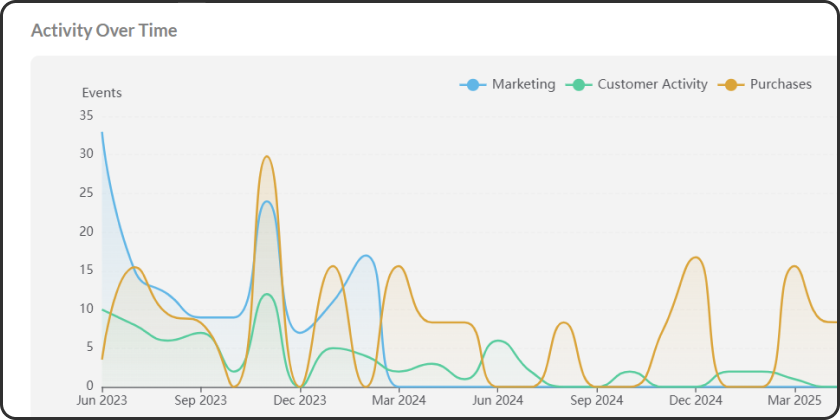
At the top of the redesigned Customer Activity page, you'll find an interactive timeline chart that plots three data series over the customer's history. Marketing activity — email deliveries and opens — appears in blue. Customer engagement like sessions and checkout events shows in green. Purchase revenue from placed orders is tracked in orange.
The chart automatically adjusts its time buckets based on how much history exists for that customer, switching between daily, weekly, or monthly views. Dual axes let you compare event counts on one side and revenue on the other, and hovering over any point reveals a detailed tooltip with formatted values.
What makes this particularly useful is the ability to visually correlate cause and effect. You can see, at a glance, how a marketing email led to a site visit that led to a purchase. That pattern — marketing touch to engagement to revenue — is the story every merchant wants to understand, and now it's visible without running a single report.
At-a-Glance Insights
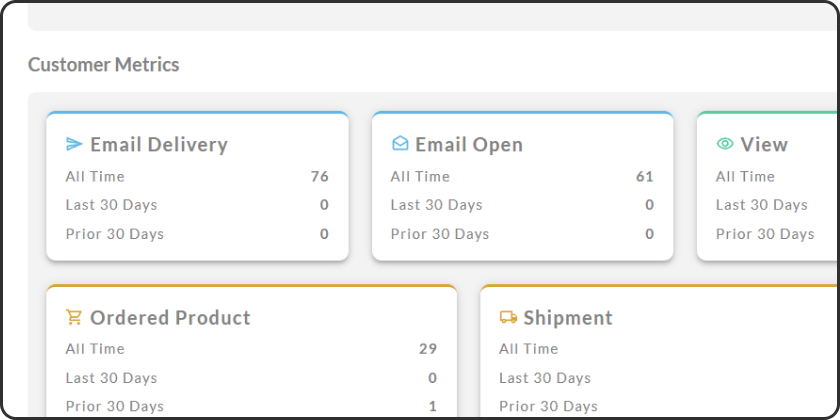
Below the timeline, the metric summary cards now feature colored accent borders that match the chart's data categories. Blue-bordered cards display marketing metrics like email deliveries and opens. Green accents highlight engagement metrics such as page views and checkout initiations. Orange borders call out purchase metrics including orders and shipments.
Each card also includes a matching icon, making it easy to scan the full set of metrics and immediately find what you're looking for. If you want to know how many times a customer opened your emails last month, the blue-bordered card with the email icon gets you there in seconds.
Start an SMS Conversation
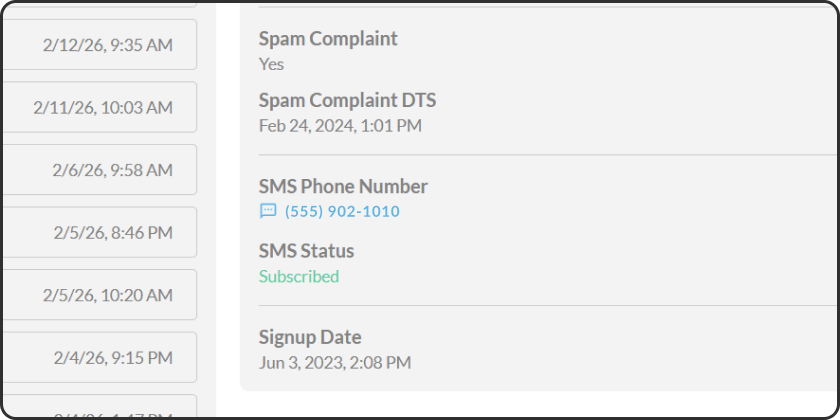
When a customer has an SMS-capable phone number on file, it now displays as a clickable link with an SMS icon directly on their activity page. Clicking it does more than just open a blank conversation — UltraCart first checks whether you already have an SMS thread with that customer. If a conversation exists, you're taken straight to it. If not, a new conversation opens with the customer's phone number pre-filled and ready to go.
For merchants with a single PBX number configured, UltraCart automatically selects the "From" number, removing one more step from the process. The goal is simple: when you're reviewing a customer's activity and want to reach out, you shouldn't need to switch tabs, copy a phone number, or navigate to a separate messaging tool. One click, and you're in the conversation.
Reliability and Performance Improvements
Alongside the visual upgrades, this update includes fixes and performance work that make the day-to-day experience smoother. Session recording playback links now correctly use the storefront associated with each activity record, so you always land on the right recording for the right store. Previously, these links used a global setting that could point to the wrong storefront if you manage multiple stores.
Customer list queries also load faster now thanks to cached data. When browsing customer records, UltraCart checks for cached results first, reducing wait times — especially noticeable when you're working through a long list of customer profiles.
Putting It All Together
These updates are designed around a single idea: the more context you have about a customer, the better you can serve them. A color-coded dashboard tells you what's happening. An interactive timeline shows you how it all connects. And one-click SMS lets you act on what you see without losing your place.
The Customer Activity page is available now in UltraCart's CRM. Log in, navigate to any customer profile, and explore the updated activity view to see your customer data in a new light.